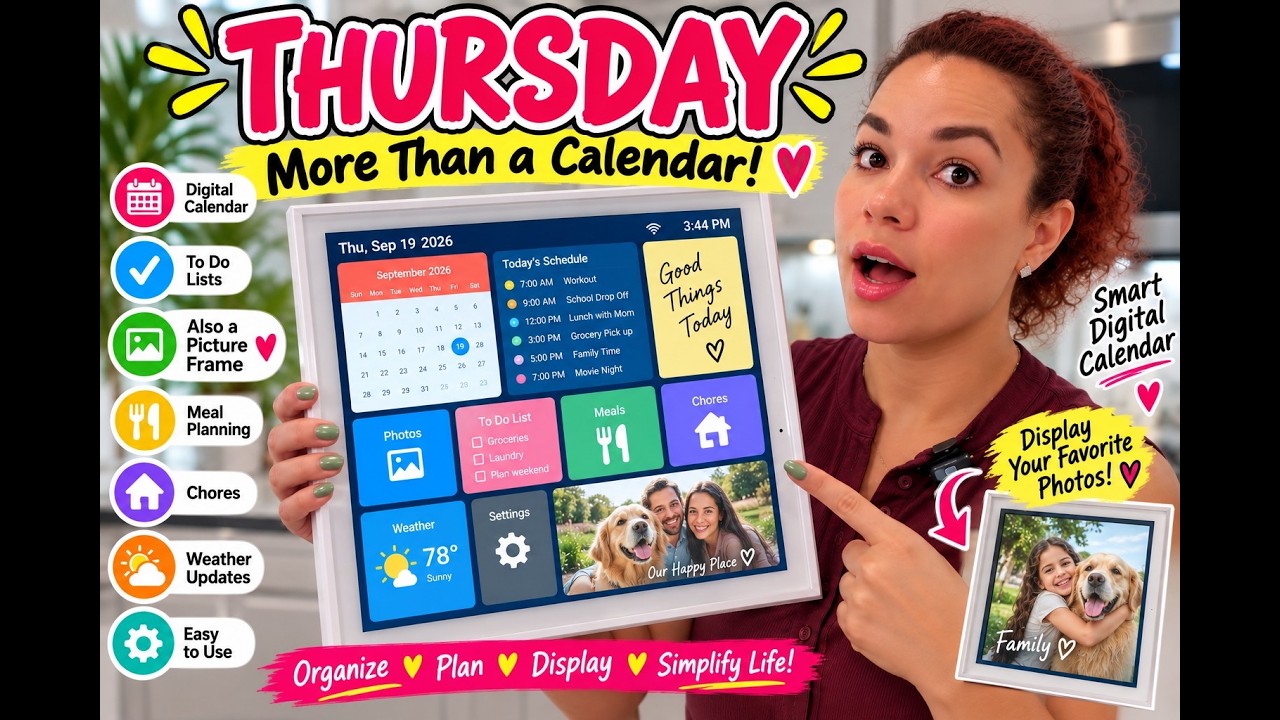
The 15.6-Inch Smart Digital Calendar & Photo Frame is worth buying if your household runs on reminders and nobody checks the shared phone calendar. It syncs Apple, Google and Outlook, runs chore charts with a rewards system, and holds photos on 32GB with no subscription. Buy it for family scheduling. Skip it if you only want a photo frame.
As an Amazon Associate, I earn from qualifying purchases, and some links on this site are affiliate links that may earn me a commission at no extra cost to you.
How this review was made: written from my own video review of this product. Every opinion here is my own, from using it myself.
Quick Verdict
I set a 5 PM reminder to pick up toys, my daughter tapped it done, and the app said “You completed the source today.” One out of one. This is a 10 out of 10 for me, with one catch: free photo transfers go nine at a time.
Buy if you:
- Have kids old enough to tap a chore off a screen
- Forget birthdays and want a reminder that rings a day before
- Want calendar, shopping, to-dos and meal plans in one place
- Want a family photo frame that isn’t a second device
Skip if you:
- Plan to load hundreds of photos at once. Free transfers cap at nine per batch, so you’re going back to the app over and over
- Only want a photo frame. You’re paying for a planner you won’t open
- Don’t want a screen living on your counter or wall
Clicking takes you to Amazon. As an Amazon Associate we earn from qualifying purchases — pricing and availability subject to change.
| Screen | 15.6″ HD touchscreen |
|---|---|
| Storage | 32GB built in |
| Calendar sync | Apple, Google, Outlook |
| Mounting | Countertop base or wall mount |
| Orientation | Portrait and landscape |
| Subscription | None required |
I Set a 5 PM Toy Reminder and It Worked
When the 5 PM toy reminder rang and my daughter tapped it done without being asked twice, I knew this thing worked. The brand sent it to me, and the first thing I did was build a real chore out of it: 5 PM, ring reminder, “pick up toys.” My daughter walked over, tapped it done, and the app logged it as one out of one. That’s the whole pitch for this 15.6-Inch Smart Digital Calendar & Photo Frame right there. It’s not a gadget you admire. It’s a thing the family touches.
Right now it’s on the table with the included base, I wanted to move it around before committing to a wall hole. It runs horizontal or vertical either way. The base-or-wall flexibility matters because wherever your family already stops, kitchen counter, mudroom, hallway, is where this thing should live.
It’s Not a Photo Frame With a Calendar Bolted On
The planner is the main event, the photos are the bonus. People see “digital calendar photo frame” and assume it’s a Nixplay-style frame that happens to show the date. It’s the opposite order. Along the top you get calendar, rewards, chores, shopping, meal plans, then pictures. Pictures are last for a reason.
So if you’re buying this purely to cycle vacation photos in the hallway, you’re overpaying for a planner you’ll never open. Buy it because the scheduling side solves something.
Chores, Rewards, and the Part My Kid Cares About
The rewards system is what makes the chore chart stick. Here’s the full loop as I ran it. I added a member of the family, picked an event type (schedule, birthday, anniversary, or countdown), set the date and time, flipped on ring reminder, and saved. Birthdays ring a day before and again the day of, and the main screen shows you the birthday is coming. This is really good for people that forget.
Then the chore side. The task shows up for whoever it’s assigned to. She taps it, the screen confirms it’s done, and it reflects in the app as one out of one. After she finishes, I go into the rewards list and give points. I gave one point five, and it showed up on her side immediately.
The to-do and shopping lists work both directions, which matters more than it sounds. I had holiday shopping already loaded, and I added “go buy some bread” from my phone as a to-do sub item. It landed on the display without me touching the screen. Meal plans sit in the same area, breakfast through dinner, if you’re the kind of person who plans the week out on Sunday. I’m loving it so far.
The calendar itself auto syncs from your phone, and the listing covers Apple, Google and Outlook. Multi-user color coding is how you tell at a glance whose day is packed.
No Subscription Is the Real Value Here
You’re not paying monthly for any of it, and that changes the math. Chore charts, reminders, meal plans, lists, 32GB of photo storage. None of it is gated behind a plan. Competing family-calendar hardware usually wants a recurring fee to unlock the features you bought the thing for.
One thing worth knowing before you click: the price on this one moves a lot. It’s sitting a bit above where it’s been over the last three months, and it’s been considerably cheaper at points. So check the live price rather than assuming today’s number is the number.
Where It Sits Against a Fridge Whiteboard
This replaces the paper calendar and the fridge whiteboard, not your phone, and that’s a meaningful distinction. Your phone is in your pocket; this is on the counter where the family already congregates. The Amazon rank (#56,079 in Office Products) tells you everything: it’s not a mass-market impulse buy. It’s a deliberate purchase by people who’ve already tried the shared phone calendar and watched it fail.
Setting It Up: Base, Wall, Nine Photos
Plug in, connect Wi-Fi, sync. I used the included base on a table because I wanted to move it around before committing to a wall. The screen is responsive, no lag when tapping through sections.
Here’s the one point I do want to remind you about. Photos transfer nine at a time on the free plan. You don’t have to pay for anything in the app, which is great, but nine is nine. If you want to transfer more than nine at a time, yes, go ahead, feel free to upgrade your plan. If not, just do nine, go back to the app, do another nine. Loading up a year of family photos that way takes a while.
Would I Keep It on the Counter? Yes
It proved itself the day a chore got done without me asking twice. That’s the test for anything claiming to organize a family. The reminders ring, the kid taps, the points land, and the shopping list I built on my phone is waiting on the screen when I walk into the kitchen. Everything in one place.
The nine-photo batching is the only thing that made me sigh. It doesn’t change what the device is good at, it just means the photo frame half of this takes patience to populate. If your house runs on reminders and nobody opens the shared calendar, stop waiting for a better option, this is it.
Pros
- Chore completion confirms on screen and reflects in the app as one out of one
- Birthday and event reminders ring a day before and the day of, plus a main-screen heads up
- Add to-dos and shopping items from your phone and they appear on the display
- Calendar, rewards, chores, shopping, meal plans and photos all in one unit
- Base for a table or wall mount, and it runs horizontal or vertical
- No subscription needed to use it
Cons
- Free photo transfers cap at nine at a time, so big photo libraries mean repeated trips back to the app
- More photos per batch means upgrading your plan
- The photo-frame side is secondary to the planner, so it’s a poor fit if frames are all you want
Frequently Asked Questions
Does it still show the calendar if the Wi-Fi drops?
Syncing needs Wi-Fi, so new events from your phone won’t arrive until it reconnects. Setup itself is plug in, connect to Wi-Fi, sync, so the connection is part of how it works day to day. Treat it as a connected device, not an offline whiteboard.
Can I type events on the screen instead of my phone?
Yes. I built the whole 5 PM toy reminder directly on the touchscreen: member, date, time, ring reminder, save. The app is convenient, not required for adding things.
Will it work for a grandparent or someone not great with tech?
It’s a good fit, mainly because the main screen tells you what’s coming without anyone opening anything. The reminders ring on their own. Someone else in the family can load the events from the app remotely.
How do I clean the screen?
Same as any touchscreen: a dry or barely damp microfiber cloth, no spray directly on the display. With kids tapping chores off it daily, fingerprints are the real maintenance job here.
Will 32GB actually fit my photo library?
32GB holds thousands of photos, so storage isn’t your bottleneck. The nine-at-a-time free transfer limit is. You’ll run out of patience long before you run out of space.
Get it now
15.6-Inch Smart Digital Calendar & Photo Frame
Get the best price on Amazon →Affiliate link. See the disclosure at the top of this post.

🛍️ Shop everything in this video
Every product mentioned, in one place. These are affiliate links, so I may earn a small commission at no extra cost to you.
🛍️ 15.6-Inch Smart Digital Calendar & Photo Frame for Family: check price on Amazon →